Transform Utility
Copy and paste Transform values in one shot.
Eliminate the hassle with shortcuts and extension buttons.
* Download available immediately after purchase
Make Transform work faster
Copying, pasting, and resetting Transform values is one of the most common operations in everyday game development. With Unity's default workflow, you often need to open a component menu first, and that tiny extra step becomes a constant low-level annoyance over time.
Transform Utility dramatically speeds up this small but frequent task. With instant keyboard shortcuts and dedicated Inspector buttons, it removes friction from repetitive work so you can stay focused on layout, level building, and actual creative decisions.
Key Features
Fastest Copy and Paste with Shortcuts
Press Alt + Shift + C / V to copy and paste a full Transform instantly. There is no need to hunt for menus with the mouse. Once your fingers memorize the shortcut, adjustments become almost automatic.

Dedicated Buttons in the Inspector
The tool adds Paste and Reset buttons directly above the Transform component. This makes the actions easy to spot and easy to use even when you are working mostly with the mouse. Common Transform operations become much more direct.
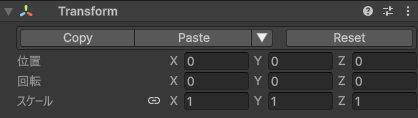
Paste Only What You Need
You can paste Position, Rotation, and Scale independently. That makes it easy to handle common situations like matching only the position while keeping the current rotation, or copying just the scale across multiple objects.
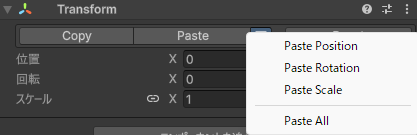
Basic Usage
- Copy: Select an object and press
Alt+Shift+C. - Paste: Select the destination object and press
Alt+Shift+V. - Use the Inspector: Click the dedicated buttons above the Transform component.
- Reset all values: Use the Reset button to return everything to its initial state.
Tips for Faster Work
- Learn the shortcuts: Once they become muscle memory, Transform adjustments become dramatically faster.
- Use partial paste: It is perfect when you want to keep the current scale but match only rotation or position.
- Speed up scene building: Arranging prefabs and aligning objects becomes much more efficient.
FAQ
Q: Does it conflict with other Inspector extensions?
A: If you use other tools that override the same Inspector with custom editors, the UI may be replaced depending on drawing order. With Unity's standard Transform component, it works without issues.
Q: Can I change the shortcut keys?
A: Yes. You can reassign them from Unity's built-in Shortcut Manager.
Q: Can I apply it to multiple objects at once?
A: Yes. If you paste or reset while multiple objects are selected, the same operation is applied to every selected Transform.
Requirements / License
- ✅ Unity 2022.3 LTS or later
- ✅ Commercial use allowed
-
Team License: $5
(available on Gumroad) - 📄 Read the full license terms